
How to let an LLM talk to your graph database - with nothing but a loop, a schema, and a couple of tools
There's a moment in every project where you look at your graph database full of rich, interconnected data and think: "I wish anyone could just ask this thing a question in plain English." That's what we built. A conversational agent that sits on top of Neo4j, translates natural language into Cypher queries, executes them, and returns human-readable answers. And the surprising part? The core architecture is almost embarrassingly simple. No framework magic. No vector databases. No RAG pipelines. Just an LLM, a loop, and two tools.
The Architecture in One Sentence
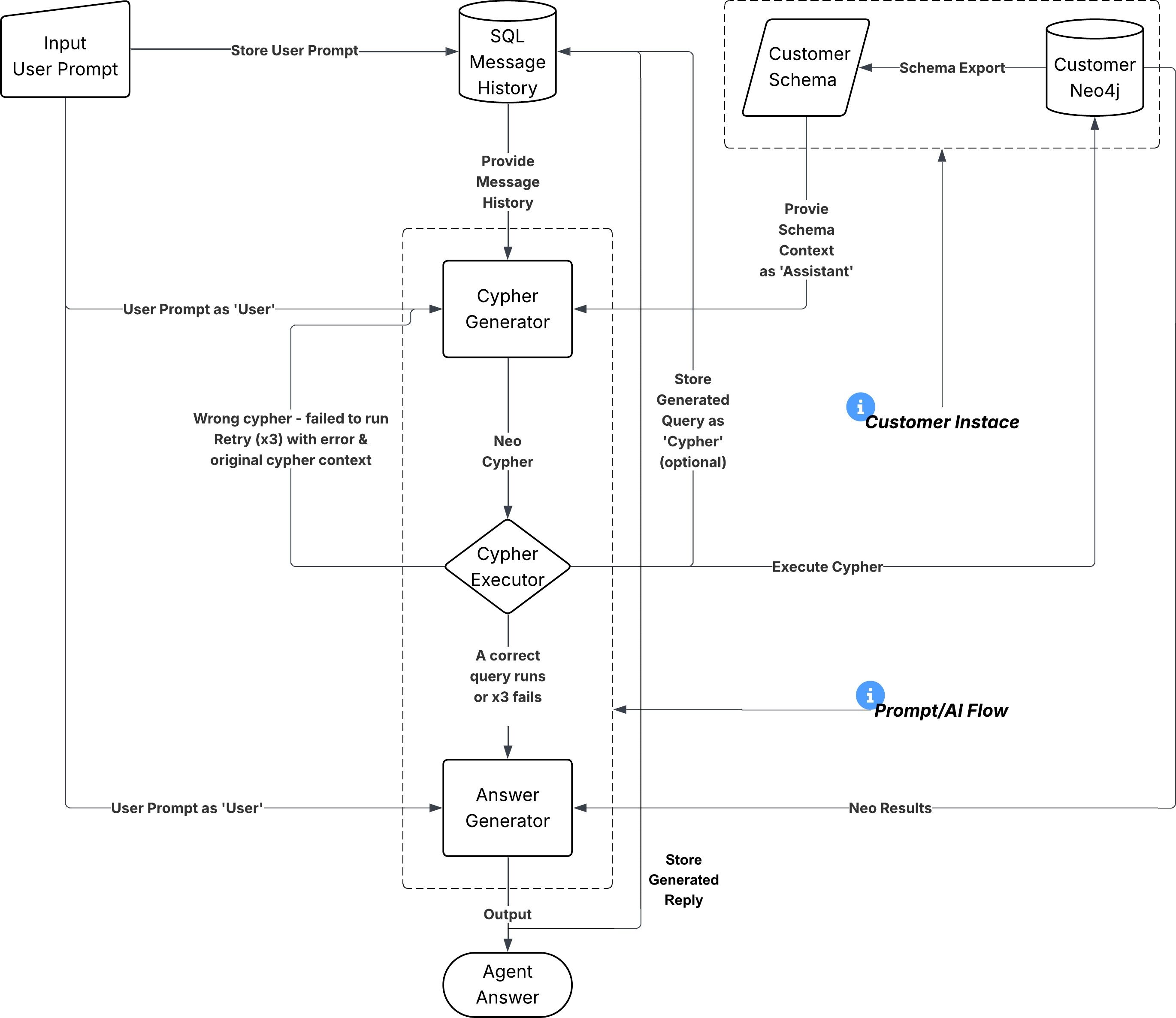
Give an LLM your database schema, hand it a tool that runs Cypher queries, and let it iterate until it has an answer. That's it. That's the entire idea. Let's break it down.
What This Is NOT
Let's be clear about the boundaries: This is not RAG. We're not embedding documents and doing similarity search. We're generating structured database queries. The "retrieval" is a precise Cypher query, not a vector similarity lookup. This is not text-to-SQL with training. There's no fine-tuning, no few-shot examples database, no query template library. The LLM generates Cypher from the schema and its general training. It works because Cypher is well-represented in LLM training data. This is not an autonomous agent framework. There's no planning module, no memory module, no goal decomposition. It's a loop with tools. The LLM's built-in reasoning is the planner.
The Three Ingredients
1. The Schema (Your Agent's Map of the World)
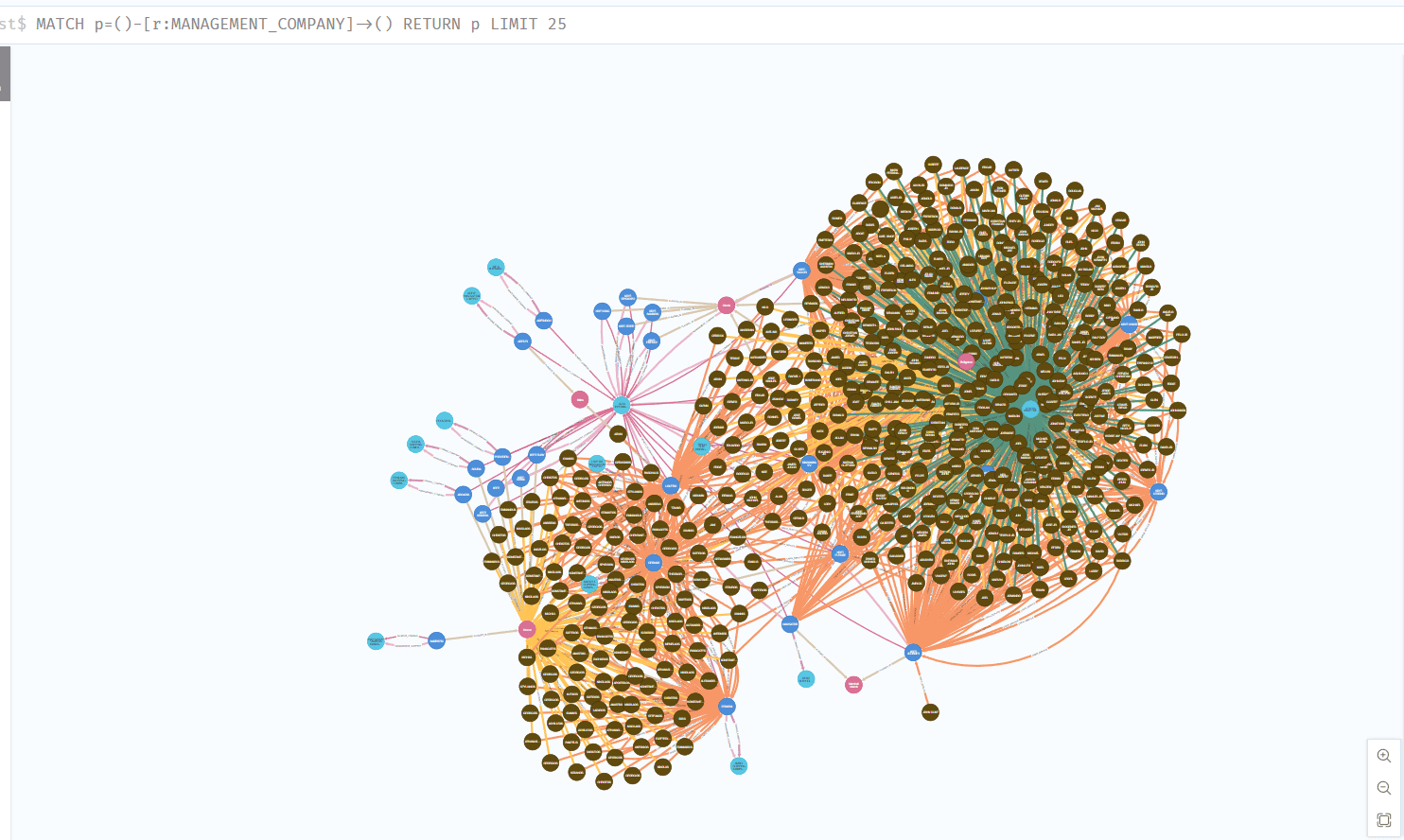
Before the agent can do anything, it needs to understand what's in your database. Not the data itself - the shape of the data. We export a plain-text schema file from Neo4j that describes: Node types and their properties (e.g., Ship has imo, shipname, dwt, vtyp) Relationship types and what they connect (e.g., CREW_SERVICE connects Seafarer → Ship) Enums and conventions (e.g., vessel types are TANKER, BULK CARRIER, etc.) Data quirks (e.g., names exist in both Greek and English: fname vs fname_e)
This schema gets injected into the LLM's system prompt. It's the agent's entire understanding of your domain. No embeddings, no retrieval step - just a well-structured text document that tells the model what nodes exist, how they connect, and what properties they carry. Key insight: A graph database schema is naturally compact. Even a production database with millions of records might only have 10–20 node types and 15–30 relationship types. The schema fits easily in a system prompt. This is a massive advantage over trying to describe a relational database with hundreds of tables.
2. The Tools (What the Agent Can Actually Do)
The agent gets exactly two tools: execute_cypher Takes a Cypher query string, runs it against Neo4j, returns the results as JSON. That's it. The LLM writes the query, we execute it, and hand back the records. Input: { query: "MATCH (s:Ship) RETURN count(s) AS total" } Output: { recordCount: 1, records: [{ total: 47 }] } get_database_schema // or hard coded schema txt file Returns the schema file. Sometimes the agent wants to re-check what properties a node has mid-conversation. This tool lets it look things up on demand rather than relying solely on the system prompt. That's the entire toolset. Two tools. One reads the schema, one runs queries. Everything else - the reasoning, the query construction, the error recovery, the natural language response - that's just the LLM doing what LLMs do. In the *.txt hard coded version you can also define more information (like data types, descriptions, sample data and even on how to handle specific nodes or properties) as you can see bellow and its even better for guiding the LLM on how to produce the cyphers.
================================================================================
NODE DATA TYPE PROPERTIES
NODE TYPE: data type // example or description
================================================================================
- Country
Tip: Each country represented in the database

- Port
Tip: These are ports and harbors represented in the database

- Ship
Tip: These are ships and vessels represented in the database

- Company
Tip: These are companies related to ship ownership, management and payment

- Seafarer
Tip: These are seafarers represented in the database
================================================================================

- Country
------------------------------------------------------------
  1. iso3166_2 : string // eg ISO 3166-2:AF
  2. numeric : string // Numeric country code eg. 004
  3. name : string // Country name eg. Afghanistan
  4. alpha2 : string // ISO 3166-1 alpha-2 eg. AF
  5. alpha3 : string // ISO 3166-1 alpha-3 eg. AFG

- Port
------------------------------------------------------------
  1. name : string // Port name
  2. longitude : number // Longitude coordinate
  3. zone_code : string // Zone code
  4. location : unknown // coordinate point
  5. code : string // Port code 5 letters
  6. latitude : number // Latitude coordinate

- Ship
------------------------------------------------------------
  1. vtype : VesselClass (enum) // Vessel (Voyage) Type
      Enum values: [OGV, CST]
  2. vslg_des : VesselDescription (enum) // Vessels Admin Group Description
      Enum values: [Small, Large, N/A]
  3. vtyp : VesselType (enum) // Vessels Type
      Enum values: [TANKER, BULKCARIER, OBO, TUGBOAT]
  4. txt : string // Remarks eg. ex ELIN ARTEMI
  5. vslw : VesselWidth (enum) // Vessel User Work Group
      Enum values: [A, B, C]
  6. rves : string // Vessel Report Description
  7. vsa : string // Current Vessel Activity Description
  8. ONRd : string // Owner Ship Date
  9. vnom : string // Vessel Law
  10. BLDd : string // Build date
  11. reg : string // Vessel Registration No (Αριθμός Νηολογίου)
  12. status : Status (enum) // Active Vessel
      Enum values: [On, Off]
  13. shipcode : string // Vessel Code
  14. dwtd : VesselSizeCategory (enum) // Category
      Enum values: [SMALL, HANDYMAX, AFRAMAX, SUEZMAX, PANAMAX]
  15. ploioname : string // Vessel Name ( IN GREEK)
  16. dwt : string // Dead Weight
  17. dwta : string // Gross Tonnage
  18. imo : string // IMO Number
  19. shipname : string // Vessel Name

- Company
------------------------------------------------------------
  1. name : string // Company name

- Seafarer
------------------------------------------------------------
  1. fname : string // First Name (Greek)
  2. fname_e : string // First Name (English)
  3. speciality_e : SailorRankEN (enum) // sailors usual speciality (English)
      Enum values: [MASTER, MASTER(Σ), SUPERINTENDENT CAPTAIN, TRAINEE MASTER, SUPERINTENDENT CAPTAIN(Σ), CHIEF OFFICER, CHIEF OFFICER (F), TRAINEE CHIEF OFFICER, 2ND OFFICER, 2ND OFFICER (N), PRACTICAL 2ND OFFICER, 3RD OFFICER, TRAINEE 2ND OFFICER, 2ND OFFICER (F), APPRENTICE DECK OFFICER, DECK TRAINEE (B'), DECK TRAINEE (A'), DECK CADET, CHIEF ENGINEER, CHIEF ENGINEER(Σ), SUPERINTENDENT CHIEF ENGINEER, TRAINEE CHIEF ENGINEER, SUPERINTENDENT CHIEF ENGINEER(Σ), 2ND ENGINEER, TRAINEE 2ND ENGINEER, 2ND ENGINEER (DISP), GR 2ND ENG.(F), 3RD ENGINEER, 3RD ENGINEER (N), PRACTICAL ENGINEER, 3RD ENG. TRAINEE, GR 3RD ENG.(F), 4TH ENGINEER, APPRENTICE ENGINEER, ENG. TRAINEE (B'), ENG. TRAINEE (A'), ENGINE CADET, APPR. ENG., ELECTRO TECHNICAL OFFICER, ELECTRO TECHNICAL RATING, ELECTRICIAN ASSIST, BOSUN, PUMPMAN, BOSUN(Σ), ABLE SEAFARER DECK, ABLE SEAFARER DECK(Σ), ORDINARY SEAMAN, SKIPPER, O.S, CARPENTER, MOTORMAN B', MOTORMAN A', MOTORMAN A'(Σ), FITTER, ABLE SEAFARER ENGINE, WI/PER, WIPER, TECHNICIAN, FIREMAN, WELDER, ENGINE TRAINEE, STEWARD, COOK, ASSISTANT STEWARD, ASSISTANT COOK, ASS STW NO LIC, RADIO OFFICER, APPR. RADIO OFFICER, VISITOR, CH OFF, MAST TRAIN, 2ND ENG, ORDINARY SEAMAN (K), VARIOUS]
  4. birthdate : string // Date of birth
  5. sailorcode : number // companys internal id code
  6. Sdate : string // Sign date
  7. speciality : SailorRankGR (enum) // sailors usual speciality (Greek)
      Enum values: [ΠΛΟΙΑΡΧΟΣ, ΠΛΟΙΑΡΧΟΣ(Σ), ΕΠΙΘΕΩΡΗΤΗΣ ΠΛΟΙΑΡΧΟΣ, ΕΚΠΑΙΔΕΥΟΜΕΝΟΣ ΠΛΟΙΑΡΧΟΣ, ΕΠΙΘΕΩΡΗΤΗΣ ΠΛΟΙΑΡΧΟΣ(Σ), ΥΠΟΠΛΟΙΑΡΧΟΣ, ΥΠΟΠΛΟΙΑΡΧΟΣ (Φ), ΕΚΠΑΙΔΕΥΟΜΕΝΟΣ ΥΠΟΠΛΟΙΑΡΧΟΣ, ΑΝΘΥΠΟΠΛΟΙΑΡΧΟΣ, ΑΝΘΥΠΟΠΛΟΙΑΡΧΟΣ (Ν), ΠΡΑΚΤΙΚΟΣ ΑΝΘΥΠΟΠΛΟΙΑΡΧΟΣ, Β' ΑΝΘΥΠΟΠΛΟΙΑΡΧΟΣ, ΕΚΠΑΙΔΕΥΟΜΕΝΟΣ ΑΝΘΥΠΟΠΛΟΙΑΡΧΟΣ, ΑΝΘΥΠΟΠΛΟΙΑΡΧΟΣ (Φ), ΔΟΚΙΜΟΣ ΠΛΟΙΑΡΧΟΣ, ΕΚΠ. ΣΠ. ΠΛ/ΧΟΣ (Β'), ΕΚΠ. ΣΠ. ΠΛ/ΧΟΣ (Α'), ΕΚΠ. ΣΠΟΥΔ. ΚΑΤΑΣΤΡΩΜ., Α' ΜΗΧΑΝΙΚΟΣ, Α' ΜΗΧΑΝΙΚΟΣ(Σ), ΕΠΙΘΕΩΡΗΤΗΣ A' ΜΗΧΑΝΙΚΟΣ, ΕΚΠΑΙΔΕΥΟΜΕΝΟΣ Α' ΜΗΧΑΝΙΚΟΣ, ΕΠΙΘΕΩΡΗΤΗΣ A' ΜΗΧΑΝΙΚΟΣ(Σ), Β' ΜΗΧΑΝΙΚΟΣ, ΕΚΠΑΙΔΕΥΟΜΕΝΟΣ Β' ΜΗΧΑΝΙΚΟΣ, Β' ΜΗΧΑΝΙΚΟΣ (ΑΔ), Β' ΜΗΧΑΝΙΚΟΣ (Φ), Γ' ΜΗΧΑΝΙΚΟΣ, Γ' ΜΗΧΑΝΙΚΟΣ (Ν), ΠΡΑΚΤΙΚΟΣ ΜΗΧΑΝΙΚΟΣ, ΕΚΠΑΙΔΕΥΟΜΕΝΟΣ Γ' ΜΗΧΑΝΙΚΟΣ, Γ' ΜΗΧΑΝΙΚΟΣ (Φ), Δ' ΜΗΧΑΝΙΚΟΣ, ΔΟΚΙΜΟΣ ΜΗΧΑΝΙΚΟΣ, ΕΚΠ. ΣΠ. ΜΗΧ/ΚΟΣ (Β'), ΕΚΠ. ΣΠ. ΜΗΧ/ΚΟΣ (Α'), ΕΚΠ. ΣΠΟΥΔ. ΜΗΧΑΝΗΣ, ΔΟΚ. ΜΗΧ., ΗΛΕΚΤΡΟΛΟΓΟΣ ΑΞΙΩΜΑΤΙΚΟΣ, ΗΛΕΚΤΡΟΛΟΓΟΣ ΚΑΤΩΤΕΡΟ ΠΛΗΡΩΜΑ, ΒΟΗΘΟΣ ΗΛΕΚΤΡΟΛΟΓΟΥ, ΝΑΥΚΛΗΡΟΣ, ΑΝΤΛΙΩΡΟΣ, ΝΑΥΚΛΗΡΟΣ(Σ), ΝΑΥΤΗΣ, ΝΑΥΤΗΣ(Σ), ΑΝΕΙΔΙΚΕΥΤΟΣ ΝΑΥΤΗΣ, ΚΥΒΕΡΝΗΤΗΣ, ΝΑΥΤΟΠΑΙΣ, ΞΥΛΟΥΡΓΟΣ, ΜΗΧΑΝΟΔΗΓΟΣ Β', ΜΗΧΑΝΟΔΗΓΟΣ A', ΜΗΧΑΝΟΔΗΓΟΣ A'(Σ), ΕΦΑΡΜΟΣΤΗΣ, ΛΙΠΑΝΤΗΣ, ΚΑΘ/ΤΗΣ, ΚΑΘΑΡΙΣΤΗΣ, ΤΕΧΝΙΚΟΣ, ΘΕΡΜΑΣΤΗΣ, ΟΞΥΓΟΝΟΚΟΛΛΗΤΗΣ, ΜΑΘΗΤΕΥΟΜΕΝΟΣ ΜΗΧΑΝΗΣ, ΘΑΛΑΜΗΠΟΛΟΣ, ΜΑΓΕΙΡΑΣ, ΒΟΗΘΟΣ ΘΑΛΑΜΗΠΟΛΟΥ, ΒΟΗΘΟΣ ΜΑΓΕΙΡΟΥ, ΒΟΗΘ. ΘΑΛ/ΛΟΥ ΟΧΙ ΑΔ., ΡΑΔΙΟΤΗΛΕΓΡΑΦΗΤΗΣ, ΔΟΚΙΜΟΣ ΡΑΔΙΟΤΗΛ/ΤΗΣ, ΕΠΙΒΑΙΝΩΝ, ΥΠ/ΡΧΟΣ, ΕΠΙΘ/ΤΗΣ ΠΛ/ΧΟΣ, Β' ΜΗΧ/ΚΟΣ, ΝΑΥΤΟΠΑΙΣ (Κ), VARIOUS]
  8. offReason : string // Offboard Reason
  9. onboard : SailorStatus (enum) // Onboard Status
      Enum values: [OFF, AVAILABLE, SIGNED_ON]
  10. lname : string // Last Name (Greek)
  11. lname_e : string // Last Name (English)


================================================================================
DETAILED RELATIONSHIP PROPERTIES
RELATIONSHIP TYPE: data type // example or description
================================================================================
- LOCATED_IN
Tip: Relationship between entities and their locations
"Ports -> Country"

- FLAGGED_IN
Tip: Relationship indicating a ship's flag country
"Ship -> Country"

- BUILT_AT
Tip: Relationship indicating where a ship was built
"Ship -> Country"

- NATIONALITY
Tips: Relationship indicating the nationality of a seafarer
"Seafarer -> Country"

- CREW_SERVICE
Tips: Relationship indicating the service of a seafarer on a ship
"Seafarer -> Ship"
================================================================================

- LOCATED_IN
------------------------------------------------------------
  (No properties found)

- FLAGGED_IN
------------------------------------------------------------
  (No properties found)

- BUILT_AT
------------------------------------------------------------
  (No properties found)

- NATIONALITY
------------------------------------------------------------
  (No properties found)

- CREW_SERVICE
------------------------------------------------------------
  1. dreason : string // Discharge Reason (Greek)
  2. Eport1 : string // Sign On Port with Details
  3. dreasonEN : string // Discharge Reason (English)
  4. ADate : string // Sign Off Date (Disembarkation Date) if value "null" then still on board
  5. Edate : string // Sign On Date (Embarkation Date)
  6. Aport : string // Sign Off Port (Disembarkation Port)
  7. Eport : string // Sign On Port (Embarkation Port)
  8. Ndate : string // Departure Date
  9. eReason : string // Reason of Service and hire
  10. Aport1 : string // string // Sign Off Port with more detail
  11. Sspeciality : string // Speciality for this service (Greek)
  12. Sspeciality_e : string // Speciality for this service (English)
3. The Loop (Where the Magic Happens)
Here's the core orchestration pattern, and it's genuinely simple:
function run(userQuestion): messages = [userMessage] messages = [userMessage]
for i in range(MAX_ITERATIONS):          // usually 10-15
    response = llm.chat(
        systemPrompt,                     // includes schema
        messages,                         // full conversation so far
        tools                             // execute_cypher, get_schema
    )

    if response.stopReason == "end_turn": // LLM is done thinking
        return response.text              // final answer

    for each toolCall in response.toolCalls:
        result = executeToolCall(toolCall) // run the Cypher query
        messages.append(toolResult)        // feed results back

    messages.append(response)             // keep the LLM's reasoning

return "Max iterations reached"
That's the entire orchestrator. The LLM decides when to query, what to query, and when it has enough information to answer. We just execute what it asks for and feed the results back in.
The loop typically runs 2–4 iterations for most questions:
- Iteration 1: LLM reasons about the question, writes a Cypher query, calls execute_cypher
- Iteration 2: LLM sees the results, maybe refines with a follow-up query
- Iteration 3: LLM has enough data, composes a natural language answer, stops
For complex questions ("Which crew members have served on ships flagged in both Greece and Panama?"), it might chain 3–4 queries. For simple ones ("How many ships do we have?"), it's a single query and done.
The System Prompt: Where Domain Knowledge Lives
The system prompt is doing heavy lifting. It's not just "you are a helpful assistant" - it contains:
- The full database schema - node types, relationships, properties
- Cypher writing guidelines - use case-insensitive matching with toLower(), handle bilingual fields, always limit results
- Domain context - what the company does, what the data represents, how to interpret maritime terminology
- Output formatting rules - present data in tables when appropriate, use English names by default
You are a maritime data assistant. You have access to a Neo4j graph
database containing information about ships, seafarers, ports,
companies, and countries.
SCHEMA:
- (Ship) properties: imo, shipname, ploioname, vtyp, dwt, ...
- (Seafarer) properties: fname_e, lname_e, speciality_e, ...
- (Ship)-[:CREW_SERVICE]->(Seafarer) with: Edate, ADate, Eport, ...
...
RULES:
- Always use case-insensitive matching: toLower(s.shipname) = toLower($name)
- Names exist in Greek and English - prefer English (_e suffix fields)
- Limit results to 50 unless the user asks for everything
This is where your domain expertise gets encoded. The LLM is a general-purpose reasoning engine - your system prompt turns it into a domain expert.
Error Recovery: Let the LLM Fix Its Own Mistakes
Here's where the loop really shines. When a Cypher query fails (wrong property name, syntax error, non-existent relationship), we don't crash. We just feed the error back to the LLM: Tool result: { success: false, error: "Property 'ship_name' does not exist. Did you mean 'shipname'?" } The LLM sees this, says "ah, let me fix that," and generates a corrected query. In practice, the agent self-corrects on the first retry about 90% of the time. For the other 10%, it gets a second and third attempt. This is a fundamentally different approach from traditional query builders where you'd need to handle every edge case in code. Here, the error handling is the LLM reasoning about what went wrong.
Why a Graph Database Makes This Work
This pattern works with SQL too, but it works better with Neo4j for a few reasons:
- Schema compactness - A graph schema is naturally small. Nodes, relationships, properties. It fits in a prompt without truncation.
- Cypher is readable - MATCH (s:Ship)-[:CREW_SERVICE]-(c:Seafarer) RETURN c.fname_e practically reads like English. LLMs generate it more reliably than complex SQL JOINs.
- Relationships are first-class - The questions people naturally ask ("who worked on which ship?", "what country is this port in?") map directly to graph traversals. There's no impedance mismatch between the question and the query.
- Multi-hop queries are natural - "Find seafarers who served on ships managed by Company X that are flagged in Greece" is a single Cypher pattern match. In SQL, that's 4 JOINs and a prayer.
Scaling Up: What You Can Add
The basic pattern is intentionally minimal, but you can layer on complexity:
- Chat history persistence - Store conversations in SQL so users can continue where they left off. The LLM maintains context across turns.
- Token budgeting - Set a ceiling on total tokens per run. When the budget runs low, ask the LLM to summarize what it knows and give a final answer.
- Cost tracking - Count input/output tokens, multiply by your provider's pricing. Log it. You'll be surprised how cheap this is - most queries cost less than a cent.
- Multiple LLM providers - Abstract the LLM behind an interface (chat(system, messages, tools) → response). Swap between providers without touching the orchestrator.
- Full-text search - Add an Elasticsearch tool alongside Cypher for when users need fuzzy text matching or document search that goes beyond the graph.
The Punchline
The entire orchestrator - the thing that turns a dumb LLM API call into a conversational graph database agent - is roughly 100 lines of actual logic. The loop, the tool dispatch, the message threading. That's it. The rest is just:
- A schema file (exported once from Neo4j)
- A well-crafted system prompt
- A thin wrapper around neo4j-driver to execute Cypher
- Some nice-to-haves: token tracking, retry limits, chat persistence
You don't need LangChain. You don't need LlamaIndex. You don't need an agent framework. You need a loop, a schema, and execute_cypher. The knowledge graph already has structure. The LLM already knows Cypher. Your job is just to connect the two and get out of the way.
Build the simplest thing that works. You'll be surprised how far it goes.